Thursday, March 26, 2015

Deploying DNN with Octopus Deploy

Disclaimer

The process that follows is what I used to successfully deploy a DNN site with Octopus Deploy. I am not entirely convinced that it is the best way to accomplish the goal, but it does work. At the end I will lay out an a potential alternative method. However, it is not something I have implemented.

Introduction

The first step is the process was to convert the DNN website to a .NET web application. This is obviously the most controversial point in the overall methodology. Converting is both non-trivial and introduces issues when upgrading to newer versions of DNN. However we were faced with a dilemma: work DNN into our existing build and deployment process, or create a new process just for DNN. We chose the former.

Our main concern was generating the NuGet package for Octopus in an automated fashion. Since we already had tooling to do this with TFS Build, it made sense to at least try to fit DNN into that that tooling.

Converting DNN to a Web Application

Conversion

The general process of converting a website to a web application is fairly straight forward and documented at MSDN: Converting a Web Site Project to a Web Application Project in Visual Studio.

However, DNN is a very large project and after the conversion was complete there were still several build errors related to name conflicts. Essentially, DNN has multiple pages, with the same name, scattered throughout the folder hierarchy. I resolved these by changing the code-behind classes’ namespaces.

For example, there are several Login.ascx controls:

  • DesktopModules\AuthenticationServices\DNN\Login.ascx
  • DesktopModules\Admin\Authentication\Login.ascx

They are both namespaced to DotNetNuke.Modules.Admin.Authentication. I simply changed the one in AuthenticationServices to DotNetNuke.Modules.AuthenticationServices. I then changed its Login.ascx to Inherits="DotNetNuke.Modules.AuthenticationServices.Login" from Inherits="DotNetNuke.Modules.Admin.Authentication.Login". I also had to add or change using statements throughout the application to import the new namespaces. Overall there were not an undue number of these changes and it took me around an hour or two to get the entire website compiling.

Libraries

Next I took all the DLLs that the project directly referenced out of the bin folder of the website and added them to source control in a Lib folder. This folder was adjacent to my Src folder in TFS. These files will automatically get copied to the bin folder when the application is built by the “copy local” mechanics. However, there were several binary files that are required by the DNN site that it does not reference directly. What I mean is that the project will build without the reference but it will not run correctly if they are not found in the bin folder. I am not familiar with DNN, so I simply assume they are plugins of some kind.

For these I created a Binaries folder within the Src folder. So I ended up with something like

Src/
    Binaries/
        Providers/
            DotNetNuke.ASP2MenuNavigationProvider.dll
            DotNetNuke.DNNDropDownNavigationProvider.dll
            ...
        CNVelocity.dll
        DNNGo.Modules.DNNGallery.dll
        ...
Lib/
    DotNetNuke.Web.dll
    ...

In the project file I added a new target to copy the binaries to the bin folder when the project is built. I put the following code at the bottom of the csproj file:

<Target Name="CopyBinaries" AfterTargets="CopyFilesToOutputDirectory">
<ItemGroup>
  <Providers Include="$(MSBuildProjectDirectory)\Binaries\Providers\*.*" />
  <Binaries Include="$(MSBuildProjectDirectory)\Binaries\*.dll" />
</ItemGroup>
  <Copy SourceFiles="@(Binaries)" DestinationFolder="$(OutDir)" ContinueOnError="true" />
  <Copy SourceFiles="@(Providers)" DestinationFolder="$(OutDir)\Providers" ContinueOnError="true" />
</Target>

This is nice because it works from both Visual Studio and TFS Build (with its default Binaries output directory).

At this point the project can be built in both and the output is exactly what can be copied to IIS under a web application folder. The next step is getting it packaged for Octopus.

Packaging for Octopus

Packaging for Octopus is very straightforward. It really is just a nupkg with everything at the root. (I have created them by simply calling NuGet.exe on the command-line with PowerShell.)

OctoPack

The Octopus Deploy team distributes a tool, called OctoPack, for packaging your build as a nupkg. I highly recommend at least attempting to implement the build using OctoPack, before continuing down our custom route.

Extending OctoPack

As I said earlier, we have an existing process for packaging .NET projects as part of our TFS Build system. The nice thing is that it also works without TFS Build.

It boils down to hooking into a somewhat undocumented way to extend MSBuild. Essentially you call MSBuild and pass it a property pointing to another MSBuild file that you extend the build with:

msbuild.exe solution.sln /property:CustomAfterMicrosoftCommonTargets=custom.proj

This is a really elegant way to extend multiple projects or solutions without having to modify them individually.

In this case, the custom.proj file contains the code necessary to build the Octopus Deploy package. (I am going to gloss over some of the details as I did not author this part of the process.)

First you need to reference the OctoPack MSBuild tasks:

<UsingTask TaskName="OctoPack.Tasks.CreateOctoPackPackage" AssemblyFile="OctoPack\targets\OctoPack.Tasks.dll" />

Then in a custom target, call CreateOctoPackPackage:

<CreateOctoPackPackage
      NuSpecFileName="$(OctoPackNuSpecFileName)"
      ContentFiles="@(Content)"
      OutDir="$(OctoPackBinFiles)" 
      ProjectDirectory="$(MSBuildProjectDirectory)" 
      ProjectName="$(MSBuildProjectName)"
      PackageVersion="$(OctoPackPackageVersion)"
      PrimaryOutputAssembly="$(TargetPath)"
      ReleaseNotesFile="$(OctoPackReleaseNotesFile)"
      NuGetExePath="$(OctoPackNuGetExePath)"
      >
      <Output TaskParameter="Packages" ItemName="OctoPackBuiltPackages" />
      <Output TaskParameter="NuGetExePath" PropertyName="OctoPackNuGetExePath" />
</CreateOctoPackPackage>

And copy the output somewhere:

<Copy SourceFiles="@(OctoPackBuiltPackages)" DestinationFolder="$(OctoPackPublishPackageToFileShare)" Condition="'$(OctoPackPublishPackageToFileShare)' != ''" />

The above code was pulled from the default OctoPack target and modified to fit our needs. Essentially we hacked it to uses our versioning scheme and we modify the OutDir to vary depending on the project type (SSDT Database Project, Console Application, or Web Site/Service). That variation is done elsewhere in our “custom.proj” file.

Finally, you just need to call MSBuild with additional commandline parameters:

/p:RunOctoPack=true /p:OctoPackPublishPackageToFileShare="[Octopus Feed]" /p:CustomAfterMicrosoftCommonTargets="[Custom.proj]"

You can add the above to your TFS Build Defintion by entering it in the MSBuild Arguments field under Advanced:

MSBuild Arguments in TFS

Modules

Most likely you will also have custom DNN modules that need to be deployed as part of the site. Since we already converted DNN to a web application, the obvious choice for this is to package them as NuGet packages and then reference them from the DNN project.

The details of packaging .NET project as a NuGet are outside the scope of this article and are well documented elsewhere. The key is that you want to build the modules as NuGet packages and deploy them to your internal NuGet repository.

Now there are two ways to handle the content files for modules:

  1. Include it in the DNN project
  2. Include it in the module NuGet

There are drawbacks to both approaches.

In the first scenario, you physically nest the module projects within the DesktopModules folder of the DNN project. You then include the files in the DNN project and change their Build Action property to Content. You must also change their Build Action property to None in the module project, so that they do not get packaged in the NuGet.

To summarize, in the first scenario, the module content is part of the DNN project and not the NuGet. The NuGet is used solely to add the DLL file to the DNN project.

The drawback here is that the module NuGets are not truly self contained and it is a complicated process to get right. Especially if you have many developers.

Despite the downsides, we took this approach. The benefit is that developers can compile the DLLs directly into the DNN site’s bin folder and run the site locally without first packaging the NuGets.

In the second scenario, you include the module content in the NuGet package. Because of this, you have to host your module projects outside of the DNN project folder structure. If they are not stored elsewhere, the NuGet packages will be deploying the content to the exact same location it is already found. However, if the content is in the NuGet, by default it will be packaged such that it is deployed with the same layout as the .NET projects. This means that they will not be deployed into the correct location. For example, if you have the following project layout:

Module/
    Module.proj
    View.ascx
    bin/
        Module.dll

You will get a NuGet with the layout:

lib/
    net40/
        Module.dll
content/
    View.ascx

This will deposit the View.ascx in the root of your DNN site!

To override the default behaviour, you need a custom nuspec file that tells the NuGet where the files should go. For example:

<files>
    <file src="View.ascx" target="DesktopModules\Custom\Module\View.ascx" />
</files>

And herein lies the major drawback of this approach: you have to maintain custom nuspec files. Once you add the <files> section, you have to specify all the files you need to include. This becomes a pain to maintain. Furthermore, you have to build and update your modules to see changes, even on your development machine.

DNN Database

Schema

Clearly DNN also has a database to deploy. I took the extra step to include this in our deployment automation. I would say that this step is optional in the grand scheme of things, but I will describe it nonetheless.

I used the excellent Sql Server Data Tools (SSDT) to reverse engineer the database schema into a .NET project. I included that project in the DNN website solution. Technet has a nice step-by-step tutorial for reverse engineering a database with SSDT.

Deploying a dacpac is a topic on its own. However, in summary, you package the nupkg with the dacpac and a Deploy.ps1 that calls SqlPackage.exe. It is not particularly complicated.

Data

Once you have the schema deploying, the immediate next question is how to deploy the data changes. For example, installing modules, adding page sections, adding modules to pages, etc… all change the site configuration data stored in the database.

The strategy here is to have a master reference database that reflects the configuration of your production database. When a new development cycle starts, you must make a clone of this database. All configuration, throughout the cycle, is done to the clone database. When the development cycle is “complete” (are we ever really done?) and you are ready to create a release, you compare the two databases and generate a migration script. In my case, I was able to use the SSDT Data Compare tool to successfully generate these scripts.

Once you’ve generated the script, you can either deploy it manually as part of the overall deployment process, or you can add it as a Post-Deployment script in your SSDT database project. Be aware that doing so can be problematic. By default dacpacs will take any version of your database to the new version. These data scripts will only operate between two specific versions.

The final step in the cycle would be to apply the script to your reference database and re-clone it, starting the cycle again.

Would I do it Again?

So, given my disclaimer and that crazy sequence of steps, you are probably wondering if there is an easier way. I think that there may be. At this point, all I know is that the process I laid out here does work. We have deployed to production multiple times now.

However, I do suspect that leaving the out the conversion to a web application would have saved a lot of time and headache. I honestly do not see why just bundling the entire site in a NuGet package would not work. Under that scenario, I would leave the modules under the DNN site’s tree structure and just zip the entire thing up in one package. As laid out by Paul, one could simply publish the site and call NuGet.exe on it. You would have to create a nuspec file. It remains to be seen how onerous that would be (there are times where you can get away with just the metadata section).

Hooking this process into the build would be a bit more complicated. First you would have to build the modules into the site’s bin directory. Then you would have publish the website to a local folder. Finally, you would have to package the results with NuGet.exe. Since we were using TFS and TFS’s Build Process Templates are, quite possibly, the worse build system ever devised, we chose webapp conversion route. Looking back I am still undecided as to which would take more time, the conversion or the custom build process template.

Thursday, March 12, 2015

Deploying Lookup Data in Dacpacs

Introduction

Deploying lookup data with a dacpac (SSDT sqlproj) is a relatively straightforward process. SqlServer dacpacs have facilities for running scripts before and after the main deployment executes. Deploying lookup/seed data with a dacpac simply consists of adding the appropriate statements to your Post-Deployment script.

It can be accomplished by following these steps:
1. Add a Post-Deployment script to your project
2. Create a script for each table to be populated
3. Reference the script from the post-deployment script
4. Populate the script with merge statements containing your data

Adding a Post-Deployment Script to Your Project

I like to keep my pre and post deployment scripts in there own folder. To do so, simply right-click the root of the project and select Add->New Folder. Name the new folder “Scripts”.

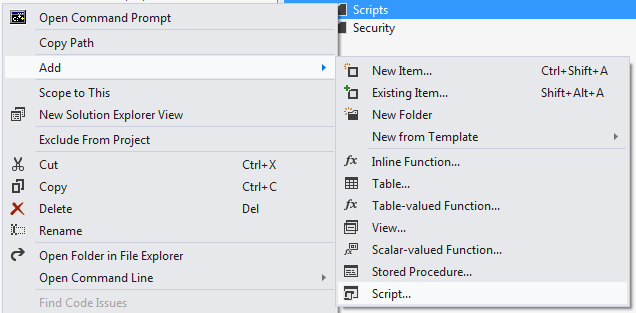
Next, right-click the Scripts folder and select Add, then way at the bottom Script...

Adding Script

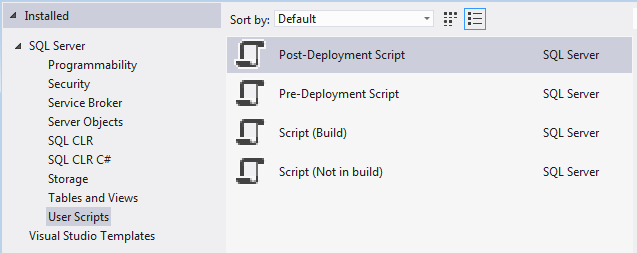
From the list of script types, pick Post-Deployment Script. I usually just call it Script.PostDeployment.sql since you can only have one Pre or Post Deployment script per project.

Script Types

Once you have added the script, look at the properties. You will notice that its Build Action is set to PostDeploy. Again, you can only have one file with this build action. However, as I will show you, you can use separate files to organize your post deployment.

Create a Script for Each Table

Now create another folder under Scripts called “LookupData”. Finally, right-click the LookupData folder and once again, add a script to you project. This time select the Script (Not in build) type and name it the same name as your table. For example, “CategoryTypes.sql”. It is important that these scripts are not included in the build as they are data-related and not schema-related. In most cases they will cause the build to fail. If you add existing scripts, from elsewhere, be sure to manually set the Build Action property to None.

Reference Your Table Scripts

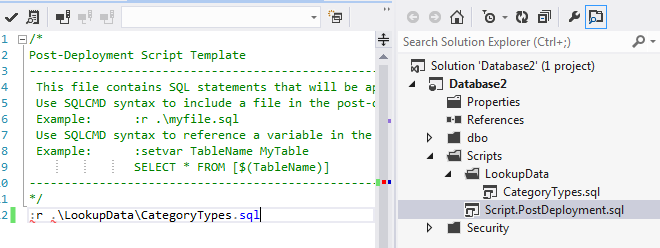
Open your post deployment script in the editor. At the top, if you read the comments, you will notice that you can use SQLCMD syntax to include addition files into the post-deployment script.

Editing

As you will notice, there are red squiggle marks under the : and . characters in the script. This is because Visual Studio does not know this script is using SQLCMD syntax. To let it know and eliminate the marks, click the SQLCMD mode button:

SqlCmd

Continue adding tables scripts and referencing them from your Post-Deployment script.

Populate the Script with Merge Statements

The last step, adding Sql Merge statements to the scripts, is the most important.

SQL MERGE statements allow the scripts to be run repeatedly without changing the state of the database (they are idempotent). Merge statements basically synchronize a source and target, adding missing rows, updating existing ones (if needed) and deleting ones that do not exist in the source.

The general syntax is described at MSDN.

An example:

MERGE INTO [CategoryType] AS Target
USING (VALUES
    (1,'Turkey')
    ,(2,'Green')
    ,(3,'Melamine')
    ,(4,'Convertible')
) AS Source ([CategoryTypeID],[Name])
ON (Target.[CategoryTypeID] = Source.[CategoryTypeID])
WHEN MATCHED AND (
NULLIF(Source.[Name], Target.[Name]) IS NOT NULL OR NULLIF(Target.[Name], Source.[Name]) IS NOT NULL) THEN
 UPDATE SET
 [Name] = Source.[Name]
WHEN NOT MATCHED BY TARGET THEN
 INSERT([CategoryTypeID],[Name])
 VALUES(Source.[CategoryTypeID],Source.[Name])
WHEN NOT MATCHED BY SOURCE THEN 
 DELETE;

Of course, you can write these statements from scratch but if you are lazy like me, you will want to generate them. Most likely you have the data in an existing development or production database. There are many tools that can take such data and generate your merge statements. One such example can be found here: https://github.com/readyroll/generate-sql-merge

Keep in mind that in practice you will not likely be able to use the delete clause at will:

WHEN NOT MATCHED BY SOURCE THEN 
 DELETE;

There will likely be historical records that will reference these lookup values. You must either remove the clause or first purge all the data referencing the removed records.

Conclusion

Following these steps you will have all of your lookup and seed data stored in source control, along with your schema. You will get all the benefits of being able to track the history and changes over time and be able to automatically sync your data when deploying your dacpacs.

Wednesday, December 31, 2014

Getting All My Mouse Buttons to Work in Linux

Introduction

When I got my new computer I bought a Logitech m510 mouse with 9 buttons.

Logitech M510 Mouse

For day to day use, and because I had other things to get working (like my keyboard), I decided to live with the out-of-the-box functionality of the mouse. I figured that when I had a burning need to use the additional buttons, I would look into them.

Many years ago I had a mouse with two thumb buttons and it was awesome for playing TFC. I had button mapped to the two types of grenades. The setup works nicely because you are not force to hold down a button on the keyboard, while trying to also press your movement keys.

Alas, it has been many many years since I have played online games, however this weekend, I found myself playing Metro Last Light. The default mapping for the alternate weapon and melee are kind of cumbersome. Suddenly I remembered my mouse had all these extra buttons and how well they worked in TFC. Finally I had a reason to set them up.

The Setup

At first, maybe naively, I tried to map them directly in the game. Unfortunately the game did not register the button clicks at all. After a bit, I thought, No worries, I’ll just map their clicks to the buttons defaulted in the game, somehow.

Making Sure the Buttons Work

The first thing to do was to see if the buttons even register to the OS. To do that, you can use xev:

$ xev | grep button

Once the little window loads, move your mouse over and start clicking away. Sure enough all my buttons were showing up. If you find that some of your buttons are not working, you will have to modify your xorg.conf file.

Mapping the Buttons

A little Google searching revealed that there is more than one way to remap keys. I know, shocking!

I decided to start with xbindkeys

swoogan@workstation:~$ xbindkeys
The program 'xbindkeys' is currently not installed. You can install it by typing:
sudo apt-get install xbindkeys

swoogan@workstation:~$ xbindkeys
Error : /home/swoogan/.xbindkeysrc not found or reading not allowed.
please, create one with 'xbindkeys --defaults > /home/swoogan/.xbindkeysrc'.
or, if you want scheme configuration style,
with 'xbindkeys --defaults-guile > /home/swoogan/.xbindkeysrc.scm'.

swoogan@workstation:~$ xbindkeys --defaults > /home/swoogan/.xbindkeysrc

Then you just need to define the mappings in your config file. For example:

# Gren
"xte 'key c'"
  b:9

# Melee
"xte 'key v'"
  b:8

To me they seem to define things in reverse. The pattern is:

# Name
"Action I want to perform"
  Event I want to trap to perform said action

Seems like a value = name sort of arrangement, but I digress. xte is a tool that will allow you to simulate button and key presses. It’s actually intended to create fake input for testing purposes. You can read the man page here.

swoogan@workstation:~$ xte 'key c'
The program 'xte' is currently not installed. You can install it by typing:
sudo apt-get install xautomation
swoogan@workstation:~$ sudo apt-get install xautomation
swoogan@workstation:~$ xte 'key c'
swoogan@workstation:~$ c

Now my two mouse buttons fire ‘c’ and ‘v’, which will work for Metro.

Except it Will Not

After loading the game I found that the key press events (xte 'key c' and xte 'key v') do not fire when in fullscreen game mode. I have not had time to look into why and to see if there is a way around this.

Final Thoughts

There are a couple of things that I would like to refine:

  1. This one is pretty obvious, it makes more sense to map the buttons to keys that are a little more obscure. For example, a modifier key like Alt or Ctrl might be better because it would be less likely to accidentally type in a document with an errant mouse click.
  2. I would like to see if this can be configured per application. I think that, in general use, I would like these buttons to be my browser forward and back buttons.
  3. The mouse actually has two additional buttons: the scroll-wheel tilts left and right. I am not really sure what I should do with those in general use. I find the left tilt very hard to execute without also pressing the wheel down.

For the second issue, I am sure I could wrap my application with as script like the following:

#!/bin/bash
killall xbindkeys && xbindkeys -f xbindkeys.someapp
someapp
killall xbindkeys && xbindkeys

But that seems pretty messy. If I find a better solution, I will be sure to write about it.

Wednesday, December 24, 2014

PowerShell Help File Authoring Woes

Poor Documentation

I was really hoping to write some killer help for (my cmdlets)[https://github.com/Swoogan/Octopus-Cmdlets], but I did not know where to start. If you search around the web and MSDN you might find the only two “helpful” files:
http://msdn.microsoft.com/en-us/library/dd878343(v=vs.85).aspx
and
http://msdn.microsoft.com/en-us/library/bb525433(v=vs.85).aspx

I was not able to find anything in the way of blogs or community documentation. There are bits and pieces, here and there, but they are mostly geared toward advanced functions (script cmdlets).

Note that there are several flaws in the second article that held me up quite a bit. For one, they say to “add the following XML headers to the text file” and list <helpItems xmlns="http://msh" schema="maml">. This is not a header. It is an opening tag that needs to be closed at the end of the document. Second, the example does not show either of the “headers”. Would it kill them to ever give an example that is complete? Finally, the page does not indicate where this file should be saved, nor does it link to the separate document that does (the first one).

Writing a Sane Example

I do not know why it would be so hard to write:

Save the following file to SampleModule\en-US\SampleModule.dll-help.xml

    <?xml version="1.0" encoding="utf-8" ?>
    <helpItems xmlns="http://msh" schema="maml">
      <command:command xmlns:maml="http://schemas.microsoft.com/maml/2004/10" xmlns:command="http://schemas.microsoft.com/maml/dev/command/2004/10" xmlns:dev="http://schemas.microsoft.com/maml/dev/2004/10">
        <command:details>
          <command:name>Get-Something</command:name>
          <command:verb>Get</command:verb>
          <command:noun>Something</command:noun>          
          <maml:description>
            <maml:para>Gets one or more somethings.</maml:para>
          </maml:description>
        </command:details>
      </command:command>
    </helpItems>

I am not sure what the redundant name, verb, and noun nonsense is about.

And it All Goes Downhill

When I started researching I was ecstatic to learn that the format is XML. I was so looking forward to writing 100% more tags than text. Remember, it is always a good idea to make writing documentation more of a pain than it already is. There is nothing like a boatload of friction to motivate people.

Oh well, after way too much time fighting the bad documentation I finally got my help file to load. What an achievement!

Here is what the system generated documentation looks like (aka no help file):

NAME
Get-Something

SYNTAX
Get-Something [[-Name] <string[]>] [<CommonParameters>]

Get-Something -Id <Int32[]> [<CommonParameters>]

And with my file:

NAME
Get-Something

SYNOPSIS
Gets one or more somethings.

SYNTAX

DESCRIPTION

RELATED LINKS

Hey, what the heck happened to my SYNTAX??? Really? If I do not define it, it goes away? REALLY???

Once again Microsoft forces you into an all-or-nothing proposition. Want to add SYSNOPSIS fields to all your cmdlets? Boom! All your SYNTAX descriptors are gone. But the SYNTAX was perfect the way it was!!!

Good thing making documentation is so much fun, or I might have started to get discouraged at that point.

WTF???

Well the only thing left to do is find out how to document the syntax. All I wanted to do was add a synopsis to each (for now) but lets see what it would take to bring this up to snuff. Here is the document on writing syntax:
http://msdn.microsoft.com/en-us/library/bb525442(v=vs.85).aspx

That is right boys and girls, you have to take all the cmdlets, in all their variations and meticulously write XML to define the usage. Were you thinking you could maybe just copy the generated output to a syntax element like so?

<command:syntax>Get-Something [[-Name] <string[]>]  [<CommonParameters>]</command:syntax>

Hahahahahahahaha hahaha haha ha…

The best part is the you get to keep your documentation sync every time you change your cmdlets. Now I am faced with a dilema:

  1. Release my young and rapidly changing project with no documentation.
  2. Write the documentation now and have to change it over and over as the API matures.

What wonderful options.

For the record, this is what the syntax XML looks like for a single variation of a single command:

   <command:syntax>
      <command:syntaxItem>
        <command:name>Invoke-psake</command:name>
        <command:parameter require="false" variableLength="false" globbing="false" pipelineInput="false" postion="0">
          <maml:name>buildFile</maml:name>
          <command:parameterValue required="false" variableLength="false">String</command:parameterValue>
        </command:parameter>
        <command:parameter require="false" variableLength="false" globbing="false" pipelineInput="false" postion="0">
          <maml:name>taskList</maml:name>
          <command:parameterValue required="false" variableLength="false">String[]</command:parameterValue>
        </command:parameter>
        <command:parameter require="false" variableLength="false" globbing="false" pipelineInput="false" postion="0">
          <maml:name>framework</maml:name>
          <command:parameterValue required="false" variableLength="false">String</command:parameterValue>
        </command:parameter>
        <command:parameter require="false" variableLength="false" globbing="false" pipelineInput="false" postion="0">
          <maml:name>docs</maml:name>         
          <command:parameterValue required="false" variableLength="false">SwitchParameter</command:parameterValue>
        </command:parameter>
        <command:parameter require="false" variableLength="false" globbing="false" pipelineInput="false" postion="0">
          <maml:name>parameters</maml:name>         
          <command:parameterValue required="false" variableLength="false">Hashtable</command:parameterValue>
        </command:parameter>
        <command:parameter require="false" variableLength="false" globbing="false" pipelineInput="false" postion="0">
          <maml:name>properties</maml:name>         
          <command:parameterValue required="false" variableLength="false">Hashtable</command:parameterValue>
        </command:parameter>
        <command:parameter require="false" variableLength="false" globbing="false" pipelineInput="false" postion="0">
          <maml:name>nologo</maml:name>         
          <command:parameterValue required="false" variableLength="false">SwitchParameter</command:parameterValue>
        </command:parameter>
     </command:syntaxItem>
   </command:syntax>

Taken from the psake help file.

Do not worry. They know there is a problem and are thinking about improving it. It is not like they are just going to totally ignore it for eight years or something.

And yes I will look into the PSCX module mentioned in that link, but in the meantime I am going to cry.

Wednesday, December 3, 2014

Raid Setup

In Search of Speed

As I mentioned in a previous post, saying that my HDD’s volume group was on /dev/sdb1 is not quite true. Although I wanted to have a large scratch space for virtual machines and renderings, I did not want sacrifice too much on speed. Both of those operations benefit from faster disks. The cost of ssds in the 512GB - 1TB range is quite prohibitive, so I sought a compromise.

RAID

Striping

I began to investigate RAID solutions. Of course there is the obvious RAID 0 array, but I have never been a fan of striping or tying two disks together in a non-redundant way. RAID 0 doubles your risk of disk failure and makes your setup more complicated. I guess I am uneasy with it because one time back in about 2002 I got a new Seagate drive and rather than making it a new E: drive, I extended my existing volume onto it. About 2 months later, the drive started to fail and I had a very difficult time getting it out of the volume without losing all my data. Having a bad drive take out a good one is maddening.

Hardware vs Software

Before I got much further, I realized I would have to answer the question of hardware or software raid. After a quick bit of googling, some ServerFault questions and a couple of blogs, I decided on software. This blog post had a lot to do with convincing me:
http://www.chriscowley.me.uk/blog/2013/04/07/stop-the-hate-on-software-raid/

Mirroring

At this point I started to look into RAID 1 (mirroring) and btrfs. I quickly discarded the idea of btrfs because I am running Kubuntu 12.04 LTS and everything I read said I should be using a more recent kernel. I am willing to patiently wait for it to come to me in the next LTS release.

What I found regarding Linux software RAID 1 is kind of surprising. All over the web you can find benchmarks that show, counter-intuitively, that RAID 1 is not any faster that a single disk. I am only referring to reads, as it is obvious that since you write to both disks it cannot be faster in that regard. It seems most people assume, like I did, that Linux software RAID 1 would read from both disks in parallel and therefore reads could peak out at 2x.

After a little more investigate, I found out that because the data is not striped, Linux only loads data from a single disk for an individual read operation. It will use both disks in parallel for multiple read operations. So for a single large file, it will read at 1x. For two large files it can read up to 2x.

RAID 5

Since I was going for speed, that meant RAID 1 was out. With that, I started looking at RAID 5. The immediate problem with RAID 5 is the cost. With a minimum of 3 disks, the smallest array possible already costs more than a 256GB SSD. I need more than 256GB, but any solution that approaches the cost of a 512GB SSD would favour the SSD.

Unfortunately, RAID 5 with three disks has pretty dismal write speeds. Although I am mainly focusing on reads, I would like to keep the write speeds up too. I believe that adding another disk to the array would increase both the read and write speeds, but at four 1TB drives you are smack dab in the 512GB SSD price range. I would certainly have more disk space but I honestly do not need 3TB. Finally, RAID 5 suffers from long rebuild times during which, other drives can fail.

RAID 10

Enter RAID 10 to the picture. RAID 10 is striping over a mirrored set. Not to be confused with mirroring over striped sets. RAID 10 is fast. Reads are akin to striping and writes go at the speed of one disk. Also, rebuild times are much faster than RAID 5. Here come the downsides though. Since the disks are in a mirrored configuration, you lose 50% of the total disk capacity. Second, it requires a minimum of four disks. I don’t care about the lost disk space; I doubt I would have used it anyway. But the cost issue raising its head again was disheartening.

The whole thing began to bug me at this point. Why did RAID 1 not get the read speeds of RAID 10 (note: I hadn’t found the reason at this point)? Why did RAID 10 require four disks? I kept thinking about it and I was sure that there should be a way to configure two disks into something like a RAID 10 array that would get the same read speeds. I realized that you should be able to segment the drives into two sections each. You could mirror the data of the section of the first disk to one of the second and vice versa. You should then be able to mirror the sets.

Tasty Cake

That is when the light bulb went off. I had seen something like this when I was reading about all the Linux software raid types. I went searching again and found my holy grail:

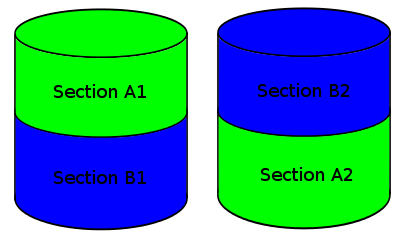
Linux kernel software RAID 1+0 f2 layout

Aka RAID 10 far layout (with two sections). It builds a RAID 10 array over two disks.

RAID 10 F2

With this setup, the read speeds are similar to striping and the write speeds are just slightly slower than a single disk.

It turns out you can build these things in a bunch of crazy ways. You can specify the number of disks (k), copies of the data (n), and sections (f). So you could have 2 copies over 3 disks, 3 copies over 4 disk with 3 sections, etc…

Once again, software raid shows its value. Without the constraints that hardware enforce, you are free to setup your system as you please.

Epilog

I have also summarized this post as an answer to a question on serverfault: https://serverfault.com/questions/158168/slow-software-raid?rq=1

In my next post I am going to talk about performance testing my setup and a few surprises I found.

Wednesday, November 26, 2014

The Joy of Working with a "Supported" Linux Device

In Search of a WiFi Adapter

After getting an Azio keyboard, I learned my lesson. Always check to make sure a device will work with Linux. Because I was moving to a suite that only had WiFi, I was going to need to get an adapter for my workstation. After a fair bit of searching, I settled on the Asus USB N13:

enter image description here

I plugged the device into my computer and Kubuntu immediately recognized it. A few minutes later, I was on Internet. A few minutes after that, I was not. On and off this thing went, like an Internet yo-yo. Additionally, every time it connected it wanted the WiFi password again.

After searching around quite a bit, it became apparent that behaviour I was seeing was a widely known problem with the kernel driver.

Linux Drivers

My first thought was to return this thing and get something that was better supported. Unfortunately there were not any better options available to me and who knew if they would work. Apparently “Supports Linux” is a vague thing.

So I downloaded the driver from Asus’s site and tried to build it. That failed with the following:

dep_service.h:49:29: fatal error: linux/smp_lock.h: No such file or directory
#include <linux/smp_lock.h>

Since the device has a rtl8192cu chipset in it, I headed over to Realtek’s website to download their version of the driver. Right away I knew I probably was out of luck. Their website says that the driver supports Linux Kernel 2.6.18 ~ 3.9. I am running Kubuntu 14.04, which has kernel version 3.13.

I decided to try compiling it anyway, but was not surprised when I got an error. The compiler was complaining that proc_dir_entry did not exist. After a bit of search, I found that proc_dir_entry had moved to /fs/proc/internal.h. It was formerly in /linux/fs_proc.h to /fs/proc/internal.h. Turns out that file was not in my kernel headers, so I had to get the kernel source:

apt-get source linux 

Then I copied the internal.h to /usr/src/linux-headers-$(uname -r)/fs/proc. I then modified the source file to include the header. After recompiling, I got the following error:

os_dep/linux/os_intfs.c:313:3: error: implicit declaration of function ‘create_proc_entry’ [-Werror=implicit-function-declaration]
rtw_proc=create_proc_entry(rtw_proc_name, S_IFDIR, init_net.proc_net);

It turns out that create_proc_entry has been deprecated in favour of proc_create. I tried changing the call, but unsurprisingly, the interface had changed too. At that point I gave up on the Linux driver.

NDISWrapper

So I went back to the Realtek site and downloaded the Windows driver, hoping to use NDISWrapper to load them. I do not know a lot about NDISWrapper, so I downloaded the GTK frontend:

sudo apt install ndisgtk

Figuring the oldest driver interface would be the most reliable, I went for the WinXP 32-bit driver first. It immediately told me that it was an invalid driver. I decided to jump over the notoriously flaky Vista drivers and go for the Win7 32-bit driver. That also seemed to be invalid. It turns out that going for the best driver was silly. I, of course, needed a 64-bit driver for my 64-bit OS.

Knowing that WinXP 64-bit drivers also fairly hit and miss, I went straight for the 64-bit Win7 driver. This driver loaded, but failed to work. Looking in dmesg there is no error. It just fails silently.

After searching and searching, I finally found this Ask Ubuntu question:
http://askubuntu.com/questions/246236/compile-and-install-rtl8192cu-driver

User mchid points to a github repo that finally gave me a working driver:
https://github.com/pvaret/rtl8192cu-fixes

It appears that the owner of the repo simply removed all the proc code from the driver.

Conclusion

Why does the out of the box Linux driver suck so bad? Why is it not dropped in favour of the GPL one written by Realtek? Having two drivers that both do not work is asinine.

Wednesday, November 19, 2014

Installing Azio Keyboard Module with DKMS

Final Chapter in the Keyboard Saga

Last week I saw a pending kernel update and I decided enough was enough. It was time to get my Azio keyboard driver working with DKMS and stop the insanity.

It turns out that using DKMS is one of the those things that ends up being a lot easier to do that you think it will be. I am so used to easy things being hard with Linux, that I forget that some hard things are easy.

I started with the Community Help Wiki article on DKMS. They have a good sample dkms.conf file that I started from:

MAKE="make -C src/ KERNELDIR=/lib/modules/${kernelver}/build"
CLEAN="make -C src/ clean"
BUILT_MODULE_NAME=awesome
BUILT_MODULE_LOCATION=src/
PACKAGE_NAME=awesome
PACKAGE_VERSION=1.1
REMAKE_INITRD=yes

I also have a driver on my system, for a USB network adapter, that uses DKMS. It’s the rt8192 for the Realtek chipset.

I took the two sample config files and merged them together, removing the duplicate lines. Then I commented out the lines that were exclusive to one file or the other and modified the common lines to match my project. Finally, I ran man dkms and began researching what the directives on each of the commented lines did.

This is what I came up with:

PACKAGE_NAME=aziokbd
PACKAGE_VERSION=1.0.0
BUILT_MODULE_NAME[0]=aziokbd
DEST_MODULE_LOCATION[0]="/kernel/drivers/input/keyboard"
AUTOINSTALL="yes"

See how simple it is?

Next I modified my make file to build/install the DKMS module. Again, I copied from the rt8192 driver. Here’s the final Makefile target:

dkms:  clean
    rm -rf /usr/src/$(MODULE_NAME)-1.0.0
    mkdir /usr/src/$(MODULE_NAME)-1.0.0 -p
    cp . /usr/src/$(MODULE_NAME)-1.0.0 -a
    rm -rf /usr/src/$(MODULE_NAME)-1.0.0/.hg
    dkms add -m $(MODULE_NAME) -v 1.0.0
    dkms build -m $(MODULE_NAME) -v 1.0.0
    dkms install -m $(MODULE_NAME) -v 1.0.0 --force

Remind me to add a version variable!

Thanks to Dylan Slavin’s awesome contribution, the driver now has a nice install.sh script to get users up and running with minimal effort.

Go and get it.